# SECTION 12: Pre-Departure Checklist

# 1. Check-in process

  • [ ] Selfie was taken
  • [ ] Address verification
  • [ ] Form Completed

# 2. Exterior Images

  • [ ] Main Dwelling (Overviews, Sections, and Close-Ups)
  • [ ] Fence (Capture estimated property line if unfenced)
  • [ ] Detached Garage
  • [ ] Storage Shed (Overviews and Close-ups)
  • [ ] Guesthouse (Overviews, Sections, and Close-Ups)
  • [ ] Swimming Pool
  • [ ] Outdoor Contents (Plastic Toolshed, Furniture, grills, etc.)
  • [ ] Other Structures (Overviews, Sections, and Close-Ups)

# 3. Drone Images

  • [ ] Property overview (1)
  • [ ] Main Dwelling (1)
  • [ ] Bird's-Eye View (16)
  • [ ] Zig Zag (9)
  • [ ] Close-Ups (Entire Roof)
  • [ ] Gutters
  • [ ] Roof Layers
  • [ ] All Secondary Structures

# 4. Interior Images

  • [ ] Main Dwelling – Only capture interior images of rooms required to insure due to claim Area(s) of interest.
  • [ ] Measurements – Document dimensions of each room showing signs of interest and include them in the job feedback (e.g., Living Room: 20' x 25') as a backup in case HOVER scan upload fails.
  • [ ] HOVER Interior Scan – Complete and submit all interior scans using the HOVER app. Ensure upload status reaches 'Evaluating' before leaving the property.
  • [ ] Always check that all Job tasks are completed.
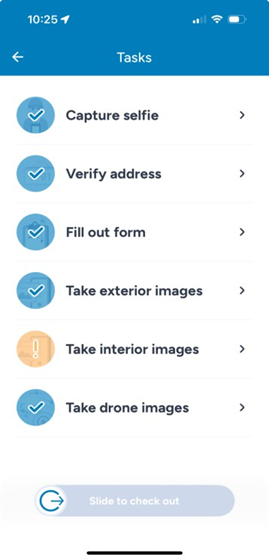
tasks

Last Updated: May 01, 2026